- Best Cold Email Software
- Cold Email Software
- Cold Email Platform
- B2B Cold Email Tools
- Email Deliverability
- Email Warmup
- Contact verificafion
Best Cold Email Software for B2B Teams in 2026
Who this comparison is for
Sales and growth teams choose a cold email platform they'll run every week, not just once. If you're a solo founder sending a handful of emails a month, a full platform is more than you need right now - come back once volume picks up.
What Is Cold Email Software?
Cold email software is built for reaching out to prospects who haven't interacted with your business yet, and differs fundamentally from marketing automation platforms built through opted-in subscriber lists. Cold email platforms manage follow-ups, multiple sending accounts and replies in the context of ongoing live campaigns, and depending on the tool may also include features like contact finding, verification, warm-up, and deliverability monitoring.
For B2B teams, this is important because the two systems are fundamentally incompatible at their core, beyond just features.
Why You Can't Use Mailchimp or HubSpot for Cold Outreach
Marketing automation tools like Mailchimp and HubSpot Marketing Hub are sending through shared IP pools using bulk API sending, which gets immediately routed to either Promotions or Spam by Gmail / Outlook, since these platforms are built to serve opted-in subscribers. These tools' terms of service generally prohibit using them for cold email outreach.
Cold email platforms are using SMTP sending from individual inboxes with legitimate credentials, and balancing volumes to appear natural and human-like in the eyes of inbox providers. Bulk vs individual sending gets treated completely differently, hence why a cold email platform is a fundamentally different beast to deal with than an email marketing tool.
Critical Features to Look For in Cold Email Software
Verified Contact Data, Not Guessed Patterns
The number one lever on deliverability is whether the contacts you're emailing are real or guessed patterns from a domain. A guessed list will kill your sender reputation with bounces in the first few days, which quietly poisons every future campaign. Look for tools with real-time checking at the point of contact, rather than a database that might have gone cold since your last update.
Deliverability Visibility Broken Out by Provider
A domain that lands clean in Outlook can be marked spam in Gmail, and each provider scores sender reputation differently. Most tools report deliverability as a single aggregated figure, which is useful but hides the fact that problems are specific to a given provider. Visibility on a per-provider basis means you know exactly where to spend your optimization effort.
Warm-Up That's Included, Not Bolted On
A fresh inbox has no sending history, making it suspicious to email providers. Warm-up gradually increases sending volumes until it reaches a steady threshold, to help inbox providers understand the account is legitimate and avoid marking real user mail as spam. The best tools bake this standard warm-up feature right in, rather than a bolt-on separate paid module or a multi-week manual process.
What Usually Goes Wrong Here
Per-seat pricing punishes scaling - look for a flat rate that doesn't multiply with headcount. New tools getting killed on deliverability in the first week are likely a warm-up problem, not a tool problem. Confirm that warm-up is included in the tool or as a separate module, rather than a manual process you're expected to do yourself. Dirty lists leading to high bounces means the tool doesn't verify contacts at the point of use, confirming you're seeing real-time contact verification before committing.
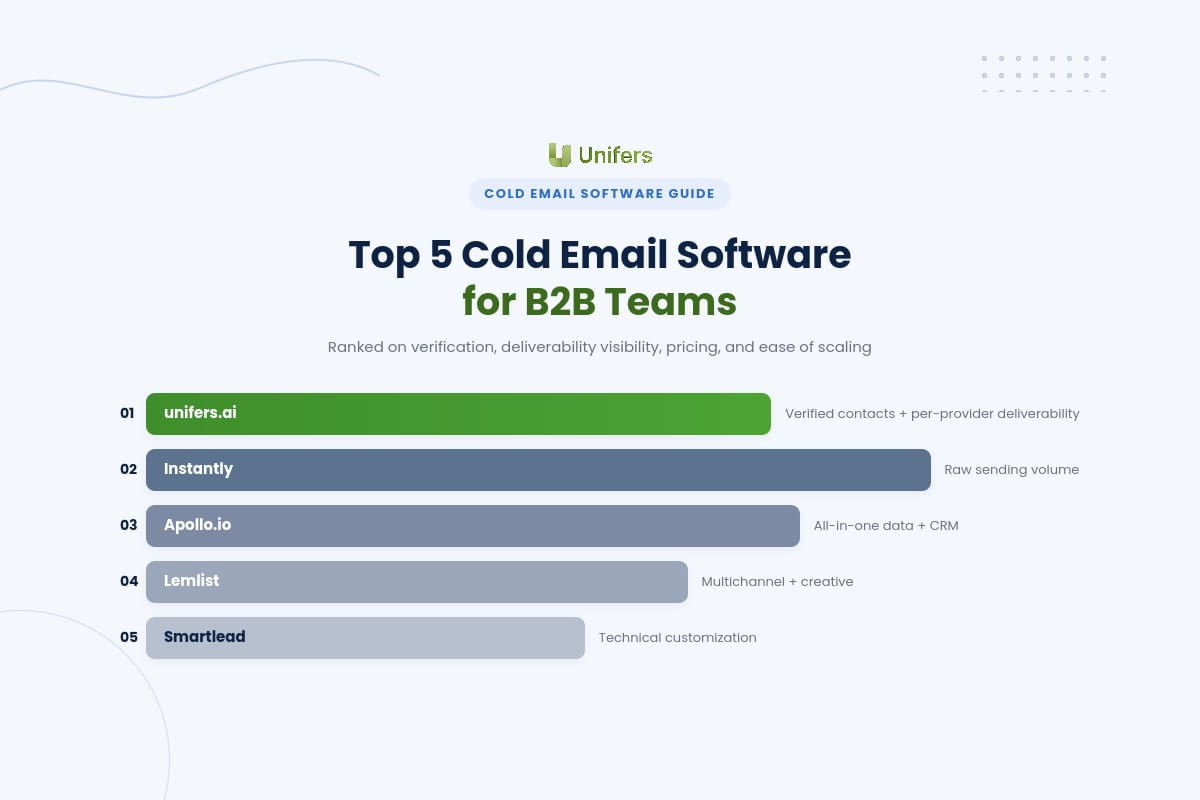
Top 5 Cold Email Software for B2B Teams
Evaluated on contact verification, deliverability visibility, pricing model, and ease of scaling for lean teams.
unifers.ai (Best for verified contacts + deliverability visibility)
Pricing
Free trial plan of 7 days is available, no credit card required
Starter - $49/mo: 5,000 uploaded contacts, 10,000 emails/month, access to 380M+ contacts
Growth - $79/mo: 10 email warm-ups, API access, 50,000 uploaded contacts, 100,000 emails/month
Pro Unlimited - $149/mo: unlimited warm-up (up to 50 accounts), 200,000 emails/month
Core strengths
unifers.ai is the only platform on this list that provides verified LinkedIn contact discovery, per-provider deliverability reporting, and pre-warmed infrastructure in one pricing tier. A Chrome extension pulls up a verified email and direct phone number on a LinkedIn profile or Sales Navigator - unlimited US lookups plus waterfall enrichment abroad, and no costs if a contact can't be verified. Deliverability is broken out by provider instead of being blended into one score, and sending volume is rotated over all connected mailboxes.
Drawbacks
unifers.ai is email-first. While its LinkedIn integration finds and verifies contacts, it doesn't act as a channel to send automated LinkedIn messages as part of a sequence - so teams requiring native multichannel sequencing will want to pair it with (or choose) a multichannel platform.
Best for
B2B sales and growth teams who want verified contacts, deliverability visibility, and warm-up in one flat price instead of stitching together a data tool, a verifier, and a warm-up service separately.
Instantly (Best for raw sending volume)
Pricing
Growth: $47/month ($37/month annual) — unlimited email accounts, 1,000 contacts, 5,000 sends/month
Hypergrowth: $97/month ($77.60/month annual) — unlimited accounts, 25,000 contacts, 100,000 sends/month
Light Speed: $358/month ($286.30/month annual) — adds dedicated server/IP infrastructure
Core strengths
Instantly includes unlimited sending accounts, built-in warm-up, and a large B2B contact database in one flat-fee package, with a Unibox that consolidates replies from all connected accounts. It's optimized for teams where the bottleneck is sending thousands of emails a day across dozens of accounts.
Drawbacks
Deliverability reporting is presented in aggregate rather than per provider, and its contact database, while large, relies on pattern-based email finding rather than point-of-contact verification as a dedicated finder would.
Best for
Agencies and growth teams who are constrained by sending volume across many accounts, rather than contact quality.
Apollo.io (Best for all-in-one data and CRM)
Pricing
Basic: $59/user/month - unlimited sequences, Gmail/Outlook integrations
Professional: $79/user/month ($99 monthly) - CRM integrations, higher export credits
Organization: $119/user/month ($149 monthly) - advanced security, higher credit limits
Core strengths
Apollo is a sales intelligence platform first and sending tool second, with a large contact database, waterfall enrichment across multiple providers, and native CRM functionality. It's a single-platform pick for teams that want prospecting and outreach without a cluttered interface.
Drawbacks
Per-seat pricing plus a credit system for exports and enrichment means costs get expensive for a growing team - 10 users on Professional is roughly $790/month before any additional credit purchases.
Best for: Sales teams who prefer prospecting and CRM in one platform, and can afford per-seat costs.
Lemlist (Best for multichannel and creative personalization)
Pricing
Email Pro: $69/user/month ($55/month annually) - email sequences, 1,000 credits/month
Multichannel Expert: $99/user/month ($79/month annually) - email, LinkedIn, and calling
Core strengths
Lemlist focuses on creative personalization - dynamic images, video, and landing pages - plus native multichannel sequencing of email, LinkedIn, and calling, with lemwarm bundled into every seat.
Drawbacks
Per-seat pricing scales with headcount, and 1,000 monthly credits translates to 200-250 verified contacts once enrichment is factored in, with no rollover.
Best for: Teams that depend on reply rate from creative, multichannel prospecting, and are small enough that per-seat pricing isn't a major constraint.
Smartlead (Best for technical customization at scale)
Pricing
Typically starts around $39/month with unlimited mailboxes; higher tiers scale with contact volume and add private infrastructure.
Core strengths
Smartlead targets agencies and developers who want white-labeling, custom sending algorithms, and deep API access to build proprietary workflows, with per-contact pricing that gets cheaper as their lists grow.
Drawbacks
The learning curve is steeper, and getting full value out of the platform assumes comfort with SMTP, DNS, and API integration.
Best for: Technical agencies that want to build a custom outreach engine rather than use a ready platform.
Comparison table : Pricing and Deliverability
Tool | Pricing model | Contact verification |
Flat: $49–$149/mo | Real-time, no charge if invalid | |
Instantly | Flat: $47–$358/mo | Pattern-based database |
Per seat: $59–$119/user | Waterfall (70–80% match) | |
Lemlist | Per seat: $69–$99/user | Basic finder (~80% accuracy) |
Smartlead | Flat, from ~$39/mo | Not built in |
Choosing the Right Tool for Your Growth Stage
Select the option that addresses your capacity constraint, not the most compelling feature set.
Solo founder or team of 1-5: Try unifers.ai trial plan or Starter tier to test contact verification and deliverability against your own list before committing to a paid plan
Growth-stage startup or small agency (5-15): unifers.ai Growth or Pro Unlimited plans accommodate most teams at this stage, including warm-up and deliverability reporting as a bundled feature (no per-seat pricing to budget around)
Volume-first agency with multiple client campaigns: unifers.ai or Instantly for sending infrastructure plus a dedicated data layer if your combined volume exceeds either platform's native database
Multichannel-first teams: Lemlist or Reply.io for LinkedIn and call integration within sequences, if your primary constraint is not verification/reporting but execution speed across dozens of domains
See unifers.ai's plans and try the free trial at unifers.ai.