- recruiting
- sourcing
- chrome extension
- email verification
The 1-Click LinkedIn Trick Recruiters Don't Talk About
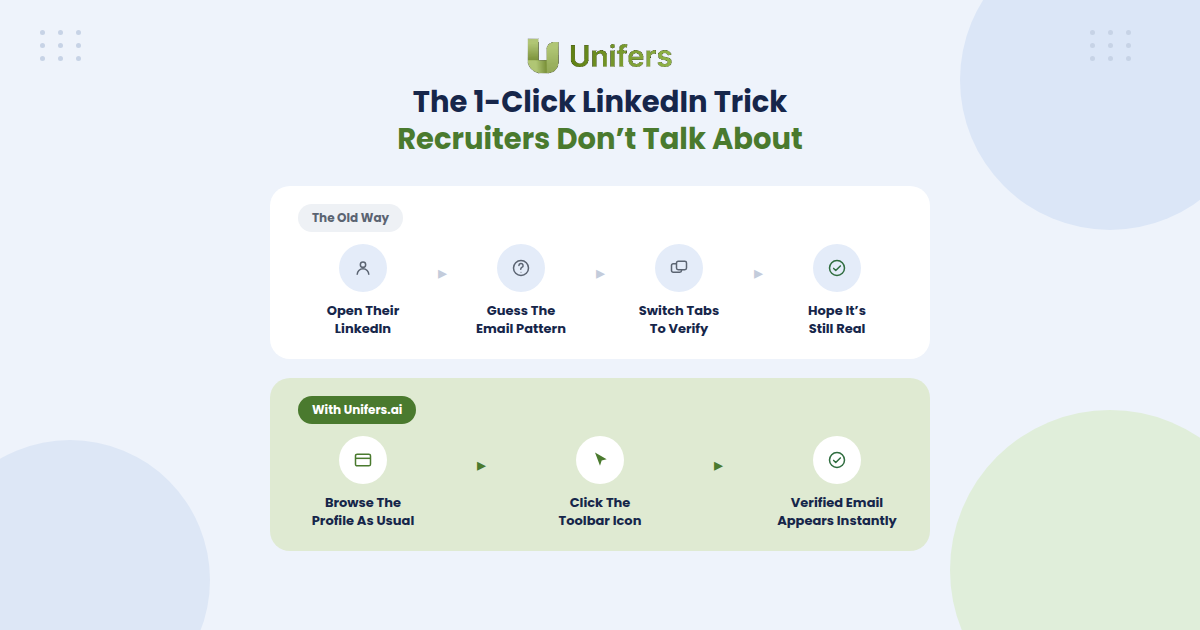
Ask any successful recruiter about their secrets to filling positions quickly, and you will receive the same well-rehearsed response: "strong network," "good instincts," and "years of experience." They will not tell you about the method that allows them to find candidates' verified emails in a fraction of the time it takes their peers. This is because the trick is so simple, and the tools used are right there, in your browser toolbar.
While other recruiters waste time rummaging through a candidate's LinkedIn "about" section or trying to Google their work email and hope for the best, the fast ones already have the verified address in their inbox draft. It is right there, in your browser toolbar.
Why This Trick Is Not Discussed Often
The main reason for this is probably that it seems too obvious to be true. Also, recruiters who use it seldom discuss it because they see no value in sharing it with their contemporaries, as it grants no particular advantage over other recruiters who do not use it. Finally, most recruiters, when hearing about the trick, would most likely assume it involves some kind of LinkedIn premium account or a paid tool that only reveals emails after tedious and time-wasting testing.
What This Trick Actually Is
The actual trick is simple: you probably already spend a lot of time browsing candidates' LinkedIn profiles in search of an email. When using our chrome extension, you will not have to switch tabs or even do anything extra: simply browse the LinkedIn profile as you normally would, and the verified email will pop up in the toolbar right there, only a click away. This dramatically reduces the time you spend searching for contacts: no switching tabs, no wasting time verifying if the email is real, and most recruiters would be surprised at how often pattern-matching fails them when they try to guess the candidate's personal email.
How This Trick Could Help You
Time is money, and any second spent searching for contacts is a second that could have been spent contacting them. If the recruiters who use such methods fill their inboxes five times faster than their peers, does it not make sense to assume that they reap five times more rewards? While most recruiters are busy switching tabs and testing their guesses in separate windows, the fast ones already have the verified email right there, in their drafts. All it takes is one click.
So the next time someone asks you how recruiters find contacts fast, tell them about this trick. If someone boasts about their years of experience and good instincts, you may want to invite them for coffee and show them how one simple chrome extension can revolutionize their LinkedIn prospecting forever.
Try finding verified LinkedIn contacts for free with Unifers.ai